When someone nearby searches for what you sell, businesses on Google Maps get the call, visit, or sale. A Google Business Profile is free, doesn’t need a website, and can be set up from your phone. This Google Business Profile setup guide for India covers how to create, verify, and improve your listing. It also covers problems most guides skip, like addresses with no street number.
What Is a Google Business Profile?
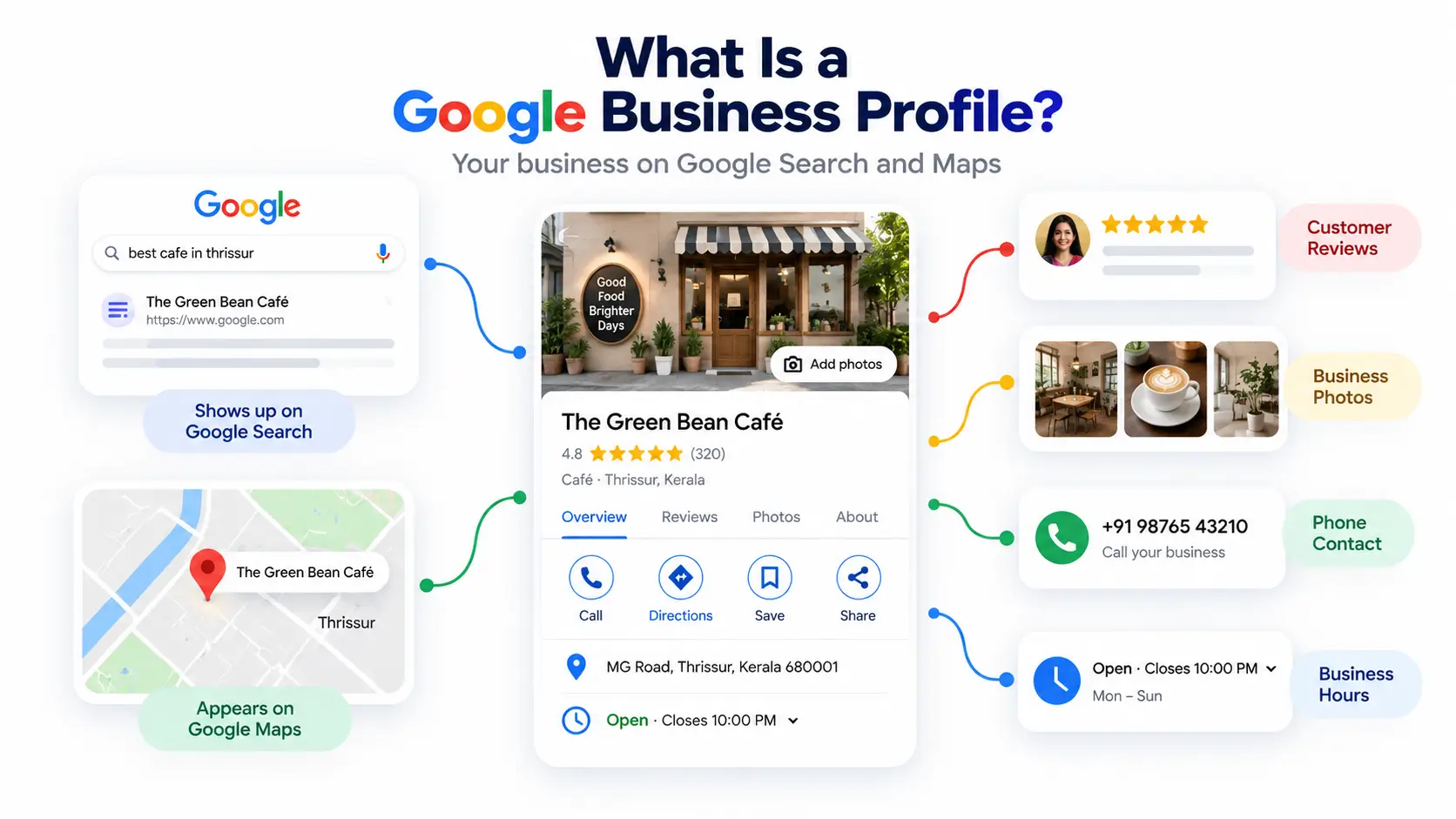
A Google Business Profile is a free listing that shows your business name, address, phone number, hours, photos and reviews on Google Search and Google Maps. Customers can call you, get directions and read reviews without visiting a website.
Completeness matters. According to Google, customers are 2.7 times more likely to see a business with a complete profile as reputable, and 50% more likely to consider buying from it. BrightLocal’s 2026 research also found that 73% of local searches start on a mobile phone. An accurate, phone-friendly listing is where most customers meet you first.
Google My Business vs. Google Business Profile
They’re the same tool. Google My Business was the old name. Google renamed it, and you can now manage your listing directly from Search and Maps. Older guides that mention Google My Business describe the same free listing.
Is it free?
Yes. There’s no setup fee or subscription. You pay only if you separately run Google Ads. Anyone charging you just to “list” your business is selling something you can do yourself.
Why Indian Businesses Need a Google Business Profile
Indian customers often search online before visiting a business or booking a service. A Google Business Profile helps local businesses appear on Google Search and Maps while giving customers quick access to their location, phone number, hours, photos and reviews.
It is especially useful for small and service-area businesses that depend on local customers. Along with local SEO, social media and other digital marketing activities, a complete profile can help customers discover the business and take action.
Before You Start: Eligibility and What You’ll Need
Who can create a profile?
You’re eligible if customers visit you at a location, such as a shop, clinic, salon or restaurant. You’re also eligible if you travel to customers, like an electrician or home tutor. That is called a service-area business. Hybrid businesses, such as a garage with roadside service, can show a storefront and a service area.
You’re not eligible if you’re online-only or if your address is a virtual office. A co-working space qualifies only if your office has clear signage, receives customers during business hours, and is staffed by your team during those hours.
Your setup checklist
- Business name exactly as on your signboard
- Full address, or a way to pin your location on the map
- A phone number you can answer (verification codes sent by call or text won’t reach an automated IVR system)
- Opening hours
- Your main business category
- 3–5 clear photos
- A Google account you’ll keep long-term
Do I need a website?
No. You can add your phone number, hours, photos and services without one. If you do have a website verified in Google Search Console, Google may offer instant verification.
How to Create Your Google Business Profile in India: Step-by-Step
Google changes button labels often. If your screen looks slightly different, follow the intent of each step.
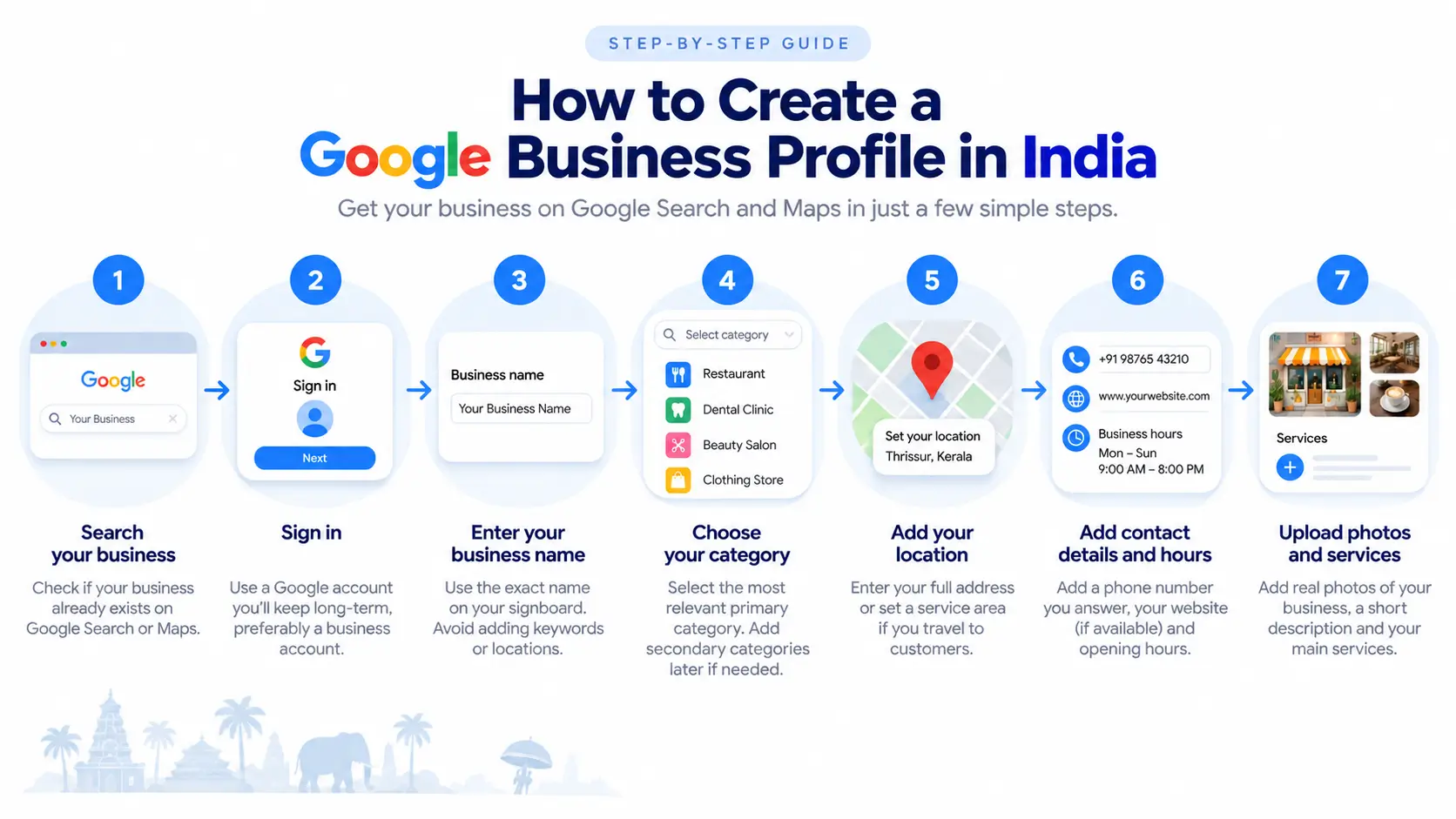
Step 1: Search for your business first
Search your business name on Google or Maps. A listing may already exist, created from public data or by a previous owner. If it does, claim it instead of creating a new one. Google’s guidelines allow only one profile per location.
Step 2: Start on your phone
Sign in with a Google account you’ll keep, ideally one tied to the business rather than an employee. Start from Google’s Business Profile page (business.google.com) or the business options in Google Maps. Video verification is typically done on a phone, so starting there saves time.
Step 3: Enter your business name correctly
Use the name on your signboard and packaging. Don’t add keywords, taglines or locations. “Sharma Sweets” is fine. “Sharma Sweets | Best Mithai Shop in Jaipur” risks suspension.
Step 4: Choose your primary category
Pick the most specific option, such as “Dental clinic” rather than “Health.” Your primary category has the biggest influence on which searches show your listing. Add secondary categories later for other services.
Step 5: Add your location or service area
If customers visit you, enter your full address and check the map pin. If you travel to customers, turn off the option to show your address and set a service area. Google says to hide your address only if you’re a service-area business.
Step 6: Add contact details and hours
Add a phone number you actually answer, your website if you have one, and your opening hours. Wrong hours quickly cost you customer trust.
Step 7: Add photos, a description and services
Upload real photos of your storefront, interior, products, and team. Then add a short, plain-language description and your main services.
How to Add Your Address in India: Even Without a Street Number
Indian addresses often don’t fit a neat street-number format. Here’s how to handle that.
Pin the location. If your address has no street number, or Google can’t find it, you can pin your business directly on the map. Zoom in and place the pin on your entrance.
Use landmarks carefully. Google says cross-streets and nearby landmarks belong only where the official address doesn’t accurately pinpoint the business. That can apply in many Indian neighbourhoods. Keep them real and nearby, and never add keywords or URLs to address lines.
Markets, malls and multi-floor buildings. Include the shop or unit number, floor and building name. Google accepts suite numbers, floors and building numbers.
Home-based businesses. If customers don’t visit your home, hide your address and list a service area instead.
Plus Codes. Google Maps gives any spot a short Plus Code. Use it to share your exact location on WhatsApp or print it on bills. Treat it as a sharing tool, and rely on the map pin for your listing.
How to Verify Your Google Business Profile in India
Google decides which verification method you’re offered, and you can’t change it. Options depend on your business type, public information, region, and hours. You may see:
- Video recording
- Phone or SMS code
- Postcard
- Instant verification (if your website is verified in Search Console)
Some Indian guides still describe postcards as the norm. More recent sources say video is now the default for many new profiles, though not all, and that postcards appear less often. If Google offers video, it recommends using it.
How to record your verification video
Use your phone and record one continuous clip showing:
- The street and your exterior signboard
- The entrance
- The interior
- Proof you manage the business, such as a till, stock or keys
Avoid capturing faces or sensitive documents. If you’re home-based or have no signage, show your workspace, tools or stock, and any branded materials.
If verification fails
A “Review issues” notice means your video wasn’t accepted. Select it, follow the instructions and re-record. If another method is available, you can try that instead. Later edits to your business details may also trigger re-verification.
Never share your verification code with anyone, even someone offering to manage your profile.
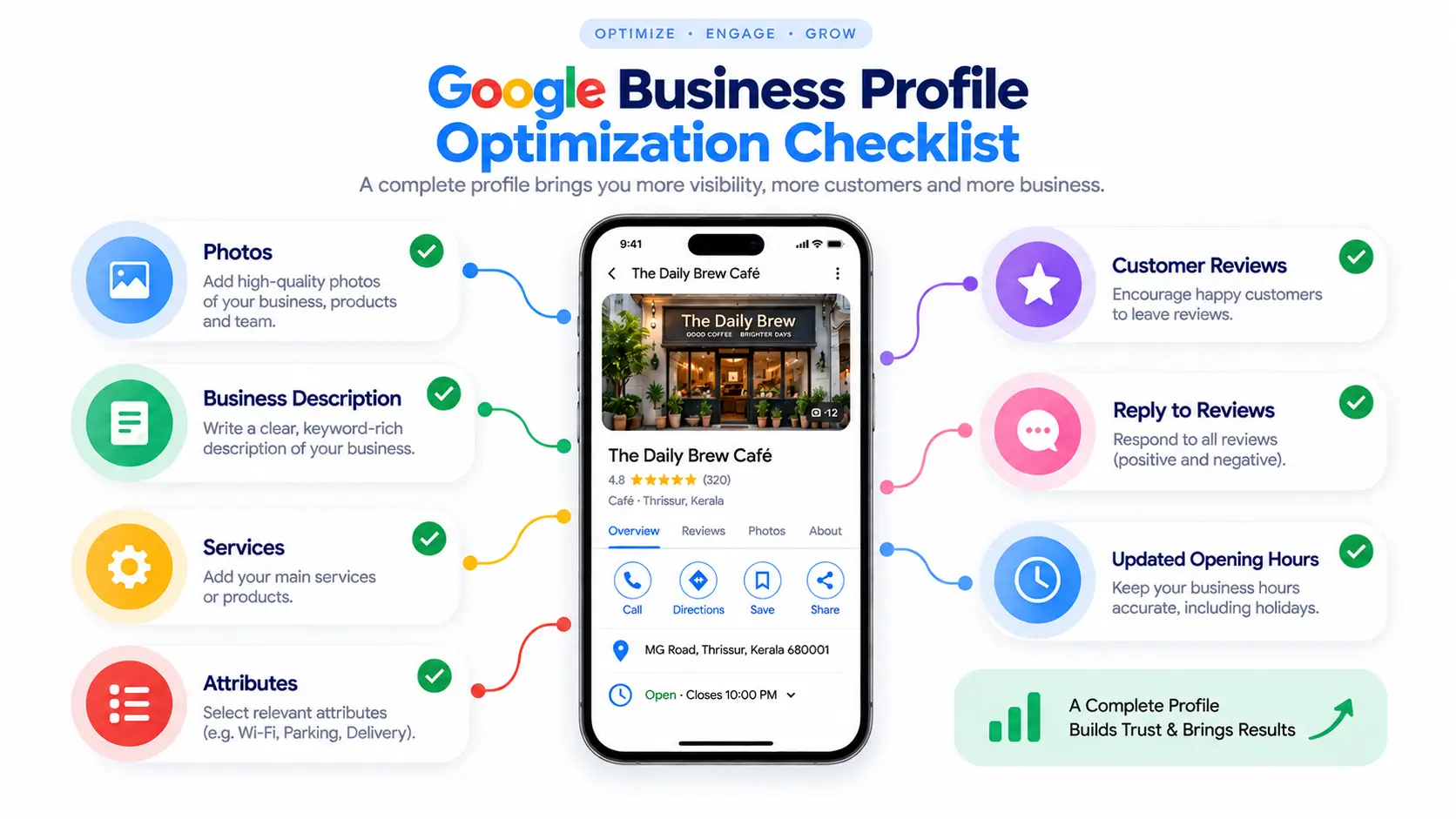
After Setup: A Quick Optimization Checklist
- Photos: Add real, well-lit images of your shop, products and team.
- Description and services: Say plainly what you sell and who you serve.
- Attributes: Fill in details like payment options and accessibility where offered.
- Reviews: Ask happy customers to review you, share your review link on WhatsApp, and reply politely to every review.
- Hours: Update them for festivals and holidays.
How Digital Marketing Supports Your Google Business Profile
A Google Business Profile is one part of a broader digital marketing strategy. While your profile helps local customers discover your business on Google Search and Maps, activities such as local SEO, social media marketing, content marketing and Google Ads can help bring more people to your brand. Keeping your website, social profiles and Google Business Profile consistent also creates a stronger online presence and makes it easier for potential customers to find and trust your business.
Mistakes That Get Profiles Suspended
Avoid these:
- Stuffing keywords into your business name
- Listing a virtual office or an unstaffed co-working space
- Creating duplicate profiles
- Buying fake reviews
- Ignoring re-verification prompts after edits
- Paying agencies for “guaranteed ranking,” or handing them your verification code
How to Track Whether It’s Working
Open your profile’s performance section once a month. Look at calls, direction requests and website clicks. Also check whether people found you by searching your name or by searching what you sell. Ten minutes a month shows what’s working.
Frequently Asked Questions
Is Google Business Profile free in India?
Yes. Creating and managing a Google Business Profile is completely free in India, with no setup fee or subscription. Google only charges if you separately choose to run paid Google Ads. Be cautious of agencies charging to “list” you on Google; you can create and manage the profile yourself.
How do I verify my Google Business Profile in India?
Google decides which verification method you get; you can’t choose it. Options include video recording, phone or SMS code, email, or a postcard, depending on your business type, region, and public information. If video is offered, Google recommends it. Never share your verification code with anyone.
Do I need a shop or physical address to create a Google Business Profile?
Not necessarily. Businesses that meet customers at a location list their address; service-area businesses, such as plumbers or home tutors who travel to customers, can hide their address and show a service area instead. Virtual offices and unstaffed co-working spaces are not eligible, and online-only businesses generally don’t qualify.
What is the difference between Google My Business and Google Business Profile?
Google My Business was the former name of the service. Google rebranded it as Google Business Profile, and you can now manage your listing directly through Google Search and Google Maps rather than a separate dashboard. The free listing itself is the same, so guides that mention Google My Business are describing the same tool.
Can I get a Google Business Profile without a website?
Yes. A website isn’t required to create a Google Business Profile. You can add your phone number, hours, address, photos, and services, and customers can call or get directions straight from the listing. A website helps with trust and can enable instant verification if you’ve verified it in Search Console, but it’s optional.
Why did my Google Business Profile video verification fail?
Video is typically rejected when it doesn’t clearly show your business. Record one continuous clip, on a phone, showing the street and exterior signage, the entrance, the interior, and proof you manage the business, such as a till or stock. If you get a “Review issues” message, follow the on-screen steps or try another available method.
Conclusion
Three things matter most: choose the right category and an accurate address, verify your profile the way Google offers, and keep collecting genuine reviews. Do those and you’ve done most of what a beginner needs for local visibility. Start today: search your business name on Google Maps and see what’s already there.