
If you’ve spent any time reading about SEO, you’ve probably run into the term “Core Web Vitals” and felt your eyes glaze over at the alphabet soup that follows: LCP, INP, CLS. The good news is that once you strip away the jargon, Core Web Vitals are a simple idea they’re Google’s attempt to measure how a website feels to use, not just how it looks on paper.
This guide breaks down exactly what Core Web Vitals are, why Google cares about them, what counts as a “good” score, and how you can check your own site today no coding background required.
What Are Core Web Vitals?
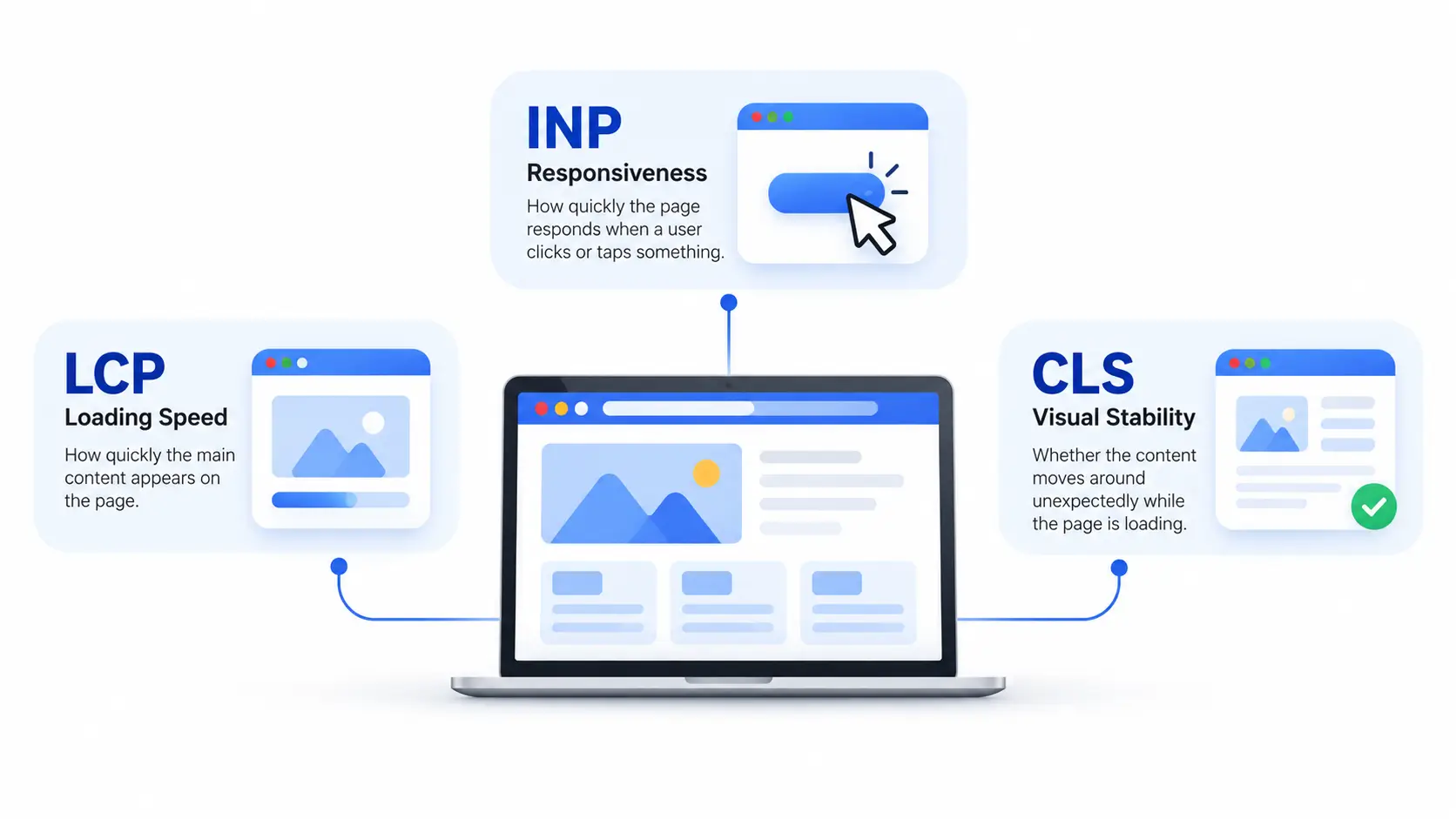
Core Web Vitals are three key metrics Google uses to measure the real-world experience of using a webpage. They look at how quickly the main content appears, how fast the page responds when a user clicks or taps something, and whether the content moves around unexpectedly while the page is loading.
They exist because “page speed” used to mean a dozen different things to a dozen different tools, with no consistent way to compare them. Google’s Chrome team narrowed things down to a small set of metrics tied directly to what a human actually experiences, then built them into the tools website owners already use: PageSpeed Insights, Search Console, and since 2021 Google Search rankings themselves.
It’s worth noting that Core Web Vitals are one part of a bigger concept called page experience, which we’ll untangle a bit further down.
The Three Core Web Vitals Metrics
LCP (Largest Contentful Paint) – Loading Speed
LCP measures how long it takes for the largest visible element on the page usually a hero image, a big headline, or a banner to fully render in the browser. It’s essentially asking: “How long does the visitor stare at a blank or half-loaded screen before they see the thing they came for?”
A slow LCP is often caused by unoptimized images, slow server response times, or render-blocking scripts and stylesheets that delay the page from painting anything meaningful.
INP (Interaction to Next Paint) Responsiveness
INP is the newest of the three metrics, and it measures something different: not how fast the page loads, but how fast it responds once it’s loaded. Every time a visitor clicks a button, taps a menu, or types into a field, INP tracks the delay between that action and the page visually reacting to it. It reports the single worst interaction across the entire visit.
INP replaced an older metric called First Input Delay (FID) in March 2024. The key difference is that FID only measured the very first interaction on a page, while INP watches every interaction throughout the whole session which makes it a much stricter, more realistic test of responsiveness, especially on pages loaded with JavaScript.
CLS (Cumulative Layout Shift) – Visual Stability
CLS measures how much content unexpectedly jumps around while a page is loading. You’ve felt this before: you go to tap a link, and at the last second an ad loads above it, so you accidentally tap something else. That frustrating shift is exactly what CLS quantifies. It’s a unitless score, where 0 means nothing moved and higher numbers mean more disruptive shifting usually caused by images or ads that don’t have reserved space, or fonts that load in and resize text after the fact.
What Counts as a “Good” Score?
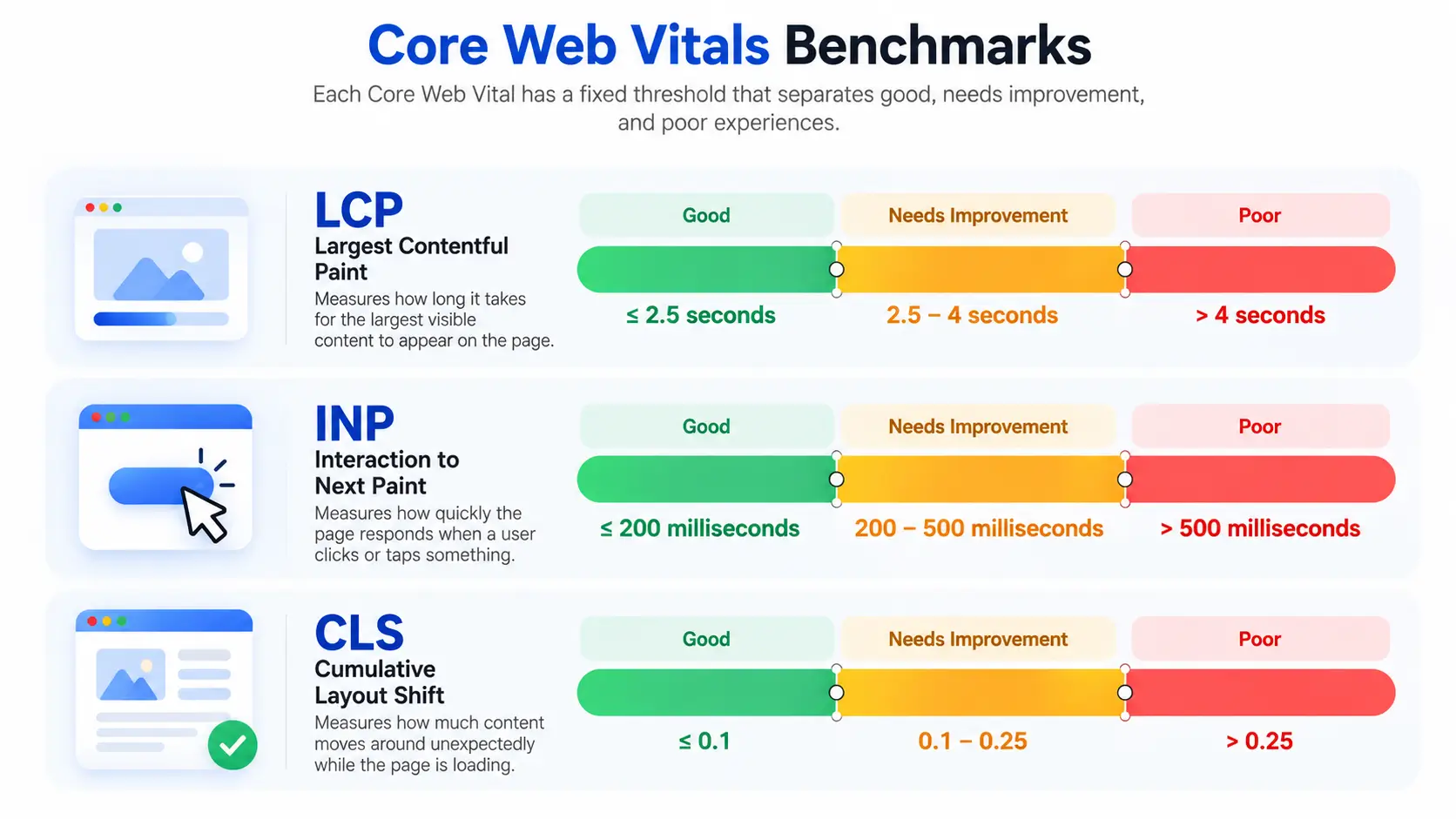
Each Core Web Vital has a fixed threshold that separates “good,” “needs improvement,” and “poor” experiences.
| Metric | Good | Needs Improvement | Poor |
| LCP | 2.5 seconds or less | 2.5–4 seconds | Over 4 seconds |
| INP | 200 milliseconds or less | 200–500 ms | Over 500 ms |
| CLS | 0.1 or less | 0.1–0.25 | Over 0.25 |
A quick myth to clear up: there’s been chatter circulating that Google quietly tightened the “good” LCP threshold from 2.5 seconds down to 2 seconds. That’s not accurate. As of Google’s own documentation, the LCP threshold remains 2.5 seconds the 2-second figure floating around is best treated as an aspirational safety margin some experts recommend, not an official standard.
Why Scores Are Measured at the 75th Percentile
Here’s a detail that trips up a lot of beginners: your Core Web Vitals scores aren’t based on your fastest visit, or even your average visit. Google looks at the 75th percentile of real visits meaning a page only earns a “good” rating if at least three out of every four visitors experienced that metric within the good threshold. This prevents a handful of fast sessions from masking a slow, frustrating experience for a large chunk of your actual visitors.
Why Core Web Vitals Matter for SEO and Users
Impact on Google Search Rankings
Core Web Vitals have been part of Google’s ranking signals since the Page Experience update in 2021. That said, it’s important to keep this in perspective: Core Web Vitals are a relatively minor ranking factor compared to content relevance and quality. A blazing-fast page that doesn’t actually answer the searcher’s question still won’t outrank a slightly slower page that does. Think of Core Web Vitals less as a golden ticket and more as a tiebreaker among pages that are already relevant.
Impact on Conversions and User Experience
Beyond on-page SEO, Core Web Vitals are a solid proxy for whether people actually enjoy using your site. Slow-loading, janky, unresponsive pages drive visitors away before they ever convert. And the numbers back this up: according to CrUX (Chrome User Experience Report) data referenced in recent industry analyses, only around 55–56% of web origins globally currently pass all three Core Web Vitals thresholds with mobile sites (roughly 50% passing) lagging notably behind desktop (roughly 57% passing). In other words, more than four in ten websites are still failing at least one of these basic experience checks, which tells you there’s real, tangible opportunity here rather than a box everyone else has already ticked.
Core Web Vitals vs. Page Experience: What’s the Difference?
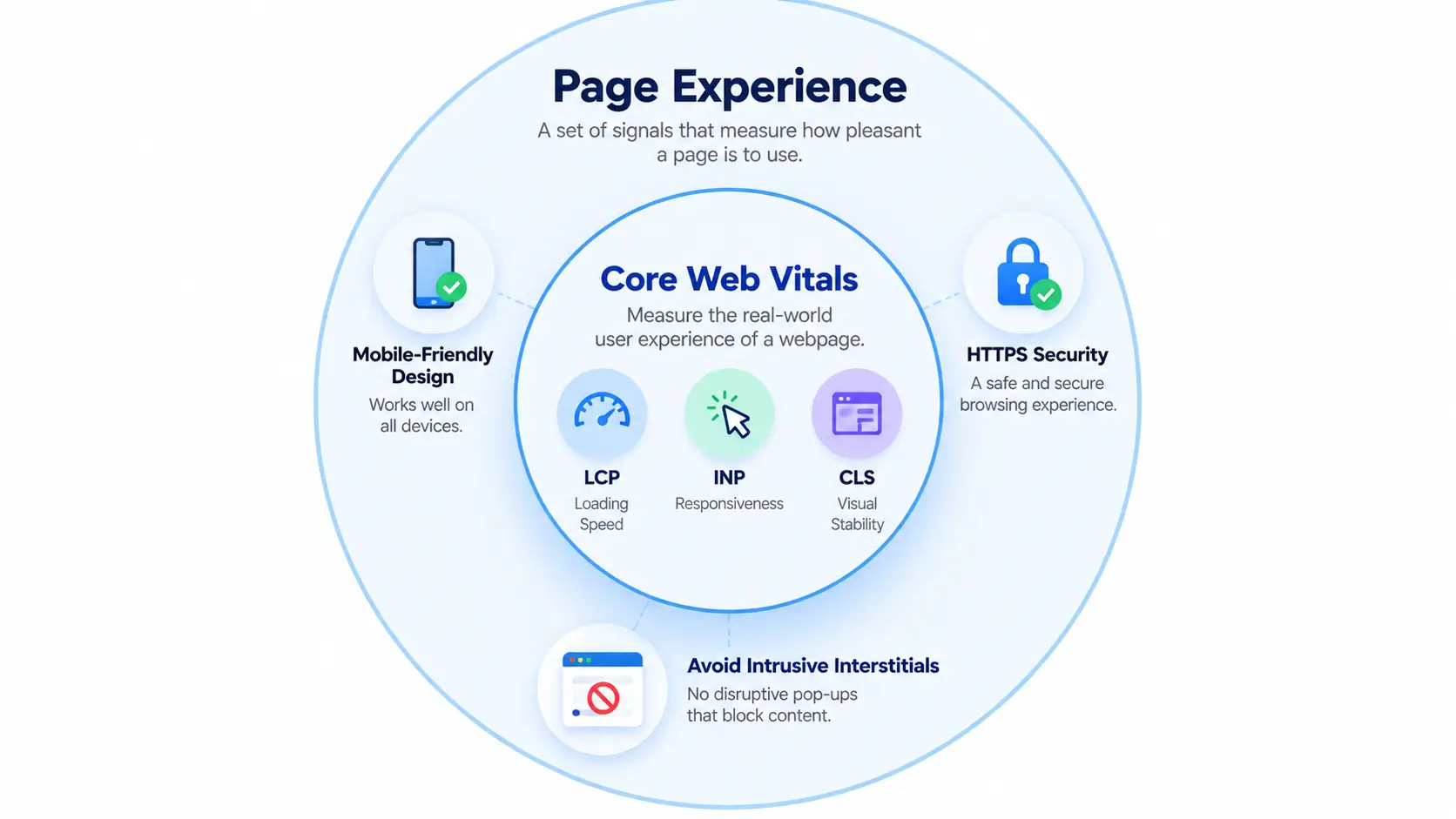
This is one of the most common points of confusion for beginners, so it’s worth spelling out clearly: Core Web Vitals are a subset of the broader “page experience” signal, not the whole thing.
Page experience also factors in things like:
- Whether your site is mobile-friendly
- Whether it’s served securely over HTTPS
- Whether it avoids intrusive interstitials (like pop-ups that block content)
So you can think of it this way: Core Web Vitals answer “does this page load fast, respond quickly, and stay visually stable?” while page experience more broadly answers “is this a safe, accessible, non-annoying page to use at all?” Core Web Vitals get most of the attention because they’re the most measurable and actionable of the bunch, but they’re not the entire picture.
How to Check Your Core Web Vitals Scores
Using Google PageSpeed Insights
PageSpeed Insights is a free tool where you paste in any URL and get back both a lab-simulated score and, if enough traffic exists, real-world field data for that page. It’s the fastest way to get an at-a-glance read on where you stand.
Using Google Search Console
If you own or manage the site, Search Console’s Core Web Vitals report is more powerful for ongoing monitoring it groups similar URLs together (so you’re not checking one page at a time) and shows real visitor data trending over time, which is especially useful for larger sites.
Lab Data vs. Field (Real-User) Data What’s the Difference
This distinction matters more than most guides admit. Lab data comes from a simulated test run in a controlled environment (this is what tools like Lighthouse produce) it’s consistent and easy to reproduce, but it doesn’t reflect real devices, real networks, or real user behavior. Field data comes from actual visitors’ browsers, aggregated through CrUX. Google’s ranking system relies on field data, not lab data so a page that scores well in a lab test can still be flagged as “poor” in Search Console if real visitors, often on slower phones or spotty connections, are having a worse experience than the simulation predicted.
Common Reasons Core Web Vitals Fail (and Quick Fixes)
Slow Server Response and Large Images (LCP Fixes)
The most common LCP culprits are slow hosting/server response times and oversized, unoptimized images. Compressing images, using modern formats, and upgrading to faster hosting are usually the highest-impact fixes.
Heavy JavaScript (INP Fixes)
INP tends to suffer on pages loaded with heavy, poorly optimized JavaScript that keeps the browser’s main thread busy, delaying its ability to respond to clicks and taps. Breaking up long-running scripts and deferring non-essential JavaScript are common remedies.
Unsized Images and Ads (CLS Fixes)
CLS problems almost always trace back to elements images, embeds, ads that don’t have reserved space before they load, causing the page to jump once they appear. Explicitly setting width and height attributes on images and reserving space for ad slots solves the majority of CLS issues.
Frequently Asked Questions
What are the three Core Web Vitals?
The three Core Web Vitals are Largest Contentful Paint (LCP), which measures loading speed; Interaction to Next Paint (INP), which measures responsiveness; and Cumulative Layout Shift (CLS), which measures visual stability. Google uses all three, measured from real user visits, to judge page experience quality.
Is Core Web Vitals a Google ranking factor?
Yes. Core Web Vitals have been part of Google’s page experience ranking signal since 2021. However, they’re a relatively small ranking factor compared to content relevance and quality — a fast page with poor content still won’t outrank a slower, more useful one.
What is a good Core Web Vitals score?
A “good” score means LCP under 2.5 seconds, INP under 200 milliseconds, and CLS under 0.1, each measured at the 75th percentile of real visitors. A page needs all three metrics in the “good” range to fully pass the Core Web Vitals assessment.
What replaced First Input Delay (FID)?
Interaction to Next Paint (INP) officially replaced First Input Delay as a Core Web Vital in March 2024. Unlike FID, which only measured the delay of a page’s first interaction, INP tracks the slowest interaction across an entire visit, giving a more complete responsiveness picture.
How can I check my site’s Core Web Vitals?
Use Google’s free PageSpeed Insights tool or the Core Web Vitals report in Google Search Console. PageSpeed Insights shows both lab data (simulated) and field data (real visitors), while Search Console groups real-user data by URL pattern across your whole site.
What’s the difference between lab data and field data?
Lab data comes from simulated tests (like Lighthouse) run in controlled conditions. Field data comes from real visitors’ actual devices and networks, captured via the Chrome User Experience Report (CrUX). Google’s ranking system uses field data, not lab data.