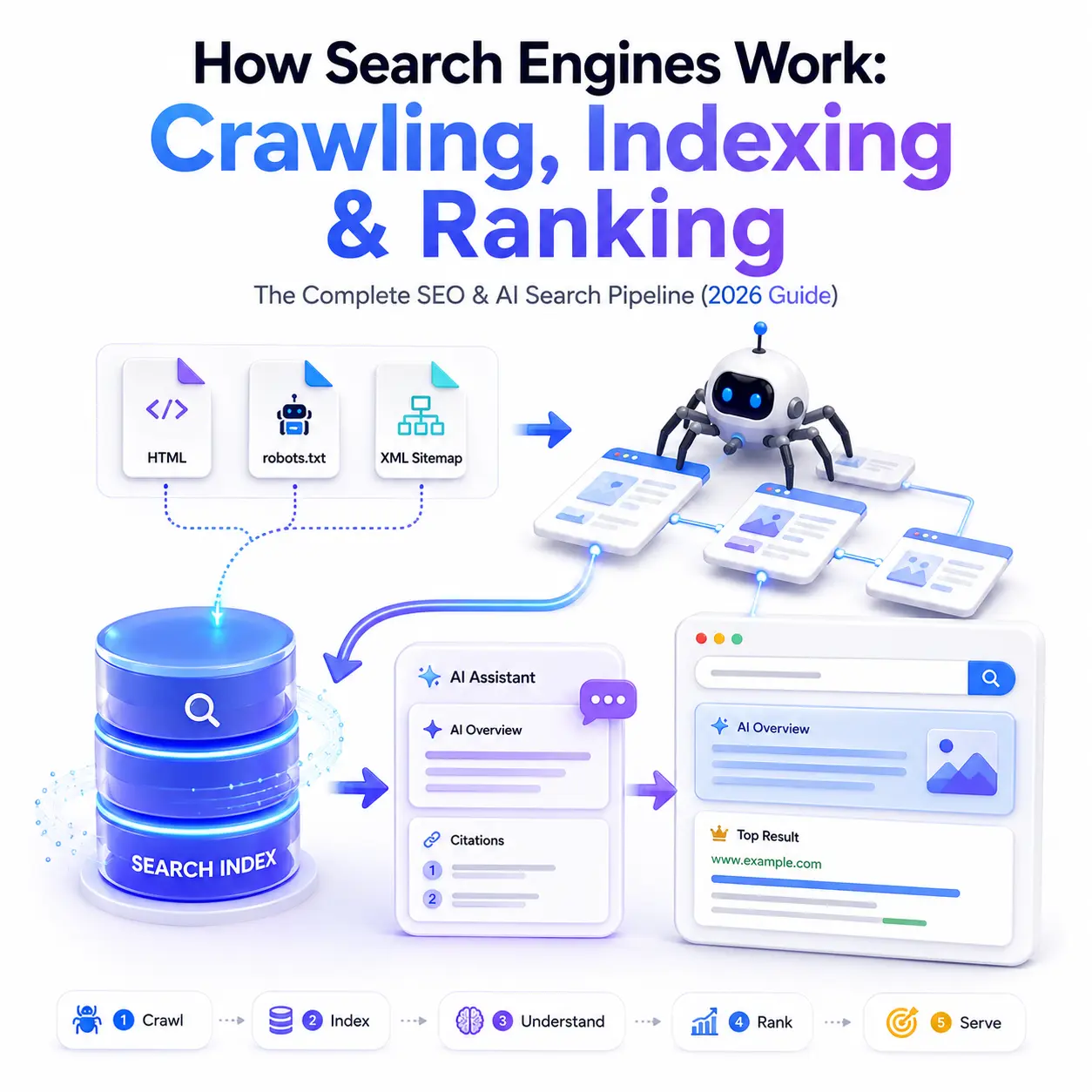
Here’s a number that reframes everything you think you know about SEO according to Ahrefs, 96.55% of indexed pages get zero organic traffic. Getting into Google’s index isn’t the finish line it’s barely the starting line. And before a page can rank, or even be indexed, it has to survive a pipeline that quietly discards most of what it touches.
If you’ve ever published a page and watched it never appear in search, this guide is for you. Understanding how search engines work specifically how crawling and indexing function is the difference between guessing why your pages don’t show up and knowing exactly where they’re getting stuck. Let’s walk through the full pipeline: crawl, index, rank, serve, and the new AI layer that’s reshaping all four.
What Are Crawling and Indexing?
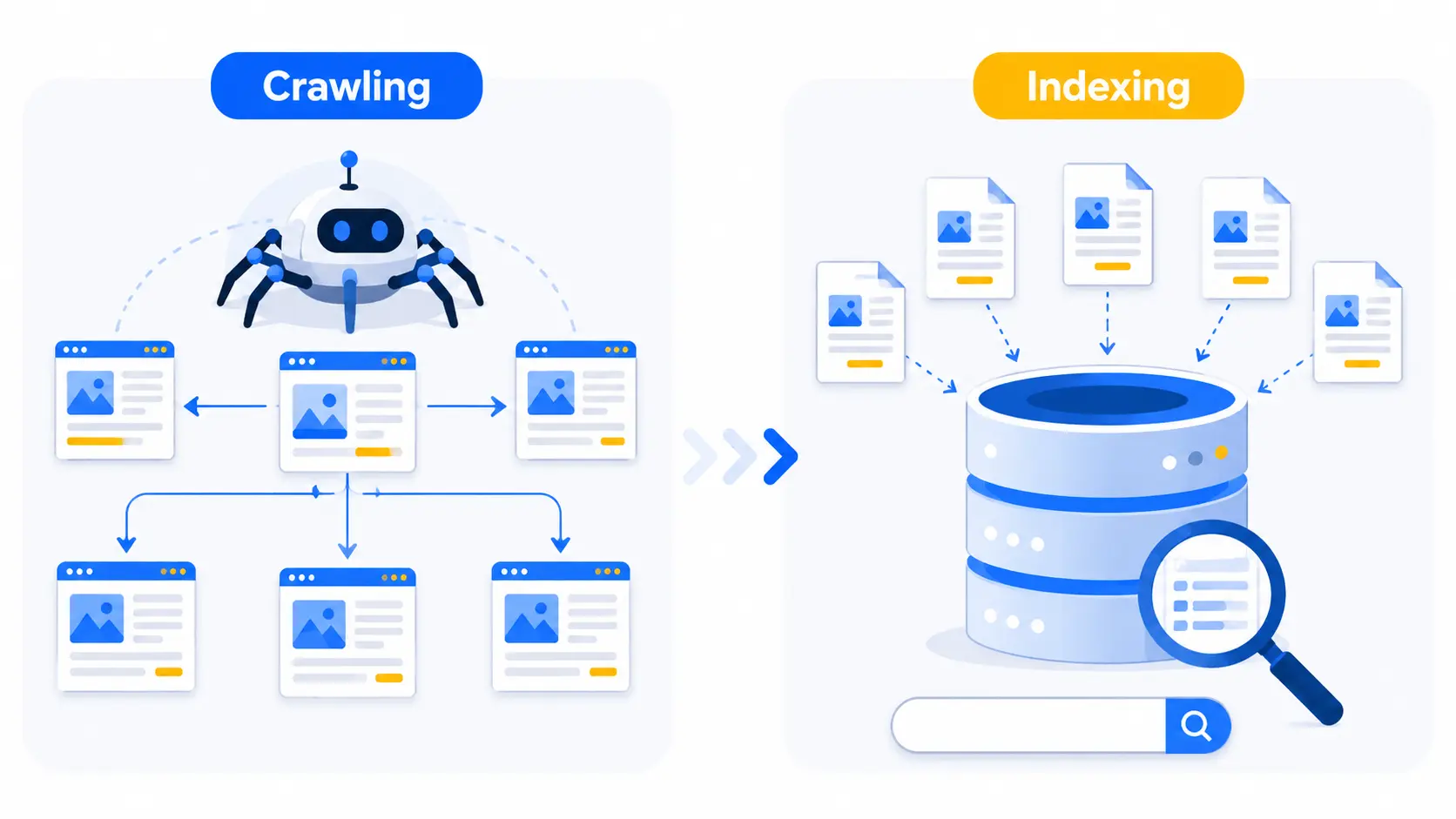
These two terms get used interchangeably, but they’re distinct steps that happen in sequence.
Crawling is discovery. A search engine sends out an automated bot Googlebot, for example that follows links across the web to find and fetch pages. Think of it as a scout mapping the territory.
Indexing is understanding and storage. Once a page is fetched, the engine analyzes its content, figures out what it’s about, and files it in a massive database called the index. Only indexed pages are eligible to appear in results.
The order matters: a page must be crawled before it can be indexed, and indexed before it can rank. Skip or fail any stage, and everything downstream collapses. This is why “my page isn’t ranking” is often really a crawling or indexing problem in disguise.
The Four Stages of How Search Engines Work
Modern search runs on four tightly coupled systems crawling, indexing, ranking, and serving with an emerging AI synthesis layer sitting on top. Here’s how each stage works and where pages tend to fall out.
Stage 1 — Crawling (Discovery)
Every crawl begins with a list of known URLs (seed URLs) and expands outward by following links. This is why internal linking and XML sitemaps are foundational SEO tasks they’re the roads crawlers travel to reach your pages. Orphan pages with no internal links pointing to them may never get discovered at all.
The first thing a well-behaved crawler fetches on any site is robots.txt a file that tells bots which areas they’re allowed to access. It’s a directive, not a lock, but legitimate crawlers respect it.
Crawling is also resource-bound. Even Google can only touch a fraction of the web each day, so it allocates a crawl budget to each site based on architecture, sitemap quality, internal linking, and how valuable it judges the content to be. Server speed matters more than most people realize here data cited across the industry suggests that improving server response times by 100ms can increase crawling by roughly 15%.
One modern wrinkle: JavaScript-heavy sites get crawled in two passes. Googlebot first grabs the raw HTML, then queues the page for a second render often hours or days later in a headless Chromium engine to execute scripts and capture the final content. Anything that only appears after client-side rendering is indexed on a delay, which is why server-side rendering (SSR) has quietly become a competitive advantage.
Stage 2 — Indexing (Understanding & Storage)
Once a page is fetched and rendered, the engine tries to understand it. It performs topic analysis, entity extraction, duplicate detection, and canonical selection deciding whether your page is the original or a copy of something it’s already seen.
Here’s the reality check most guides skip: roughly 90% of what gets crawled is never indexed. The engine filters aggressively for duplicates, thin content, and pages that fail quality thresholds. Being crawled is no guarantee of being indexed.
Pages that survive are broken down into tokens and stored in an inverted index a data structure that maps every word to the list of documents containing it. This is what makes sub-second search possible instead of scanning billions of pages per query, the engine looks up a few word-lists and intersects them. In 2026, that classic inverted index is increasingly paired with vector (semantic) indexes, so engines can also retrieve conceptually related pages that share no exact keywords.
Stage 3 — Ranking (Ordering)
Once your page is in the index, ranking decides where it appears for a given query. There is no single master signal. The old PageRank era, when link count was the killer feature, is over today links are one factor among dozens, and their weight depends on the query type.
Ranking blends relevance (does the page match the query’s intent?), quality and E-E-A-T signals, links, freshness, and personalization factors like location. The same search for “football” returns American football in the US and soccer in Europe that’s the ranker reading a location signal, not a bug. For an intermediate SEO, the takeaway is that ranking is dynamic and query-dependent, not a fixed checklist you can game once.
Stage 4 — Serving Results
Finally, the engine serves a results page in milliseconds, assembling the classic blue links alongside SERP features featured snippets, People Also Ask boxes, image packs, and now AI-generated answers. Serving is also personalized and localized, which is why two people searching the same term can see different results.
Crawl Budget — Does It Actually Matter for You?
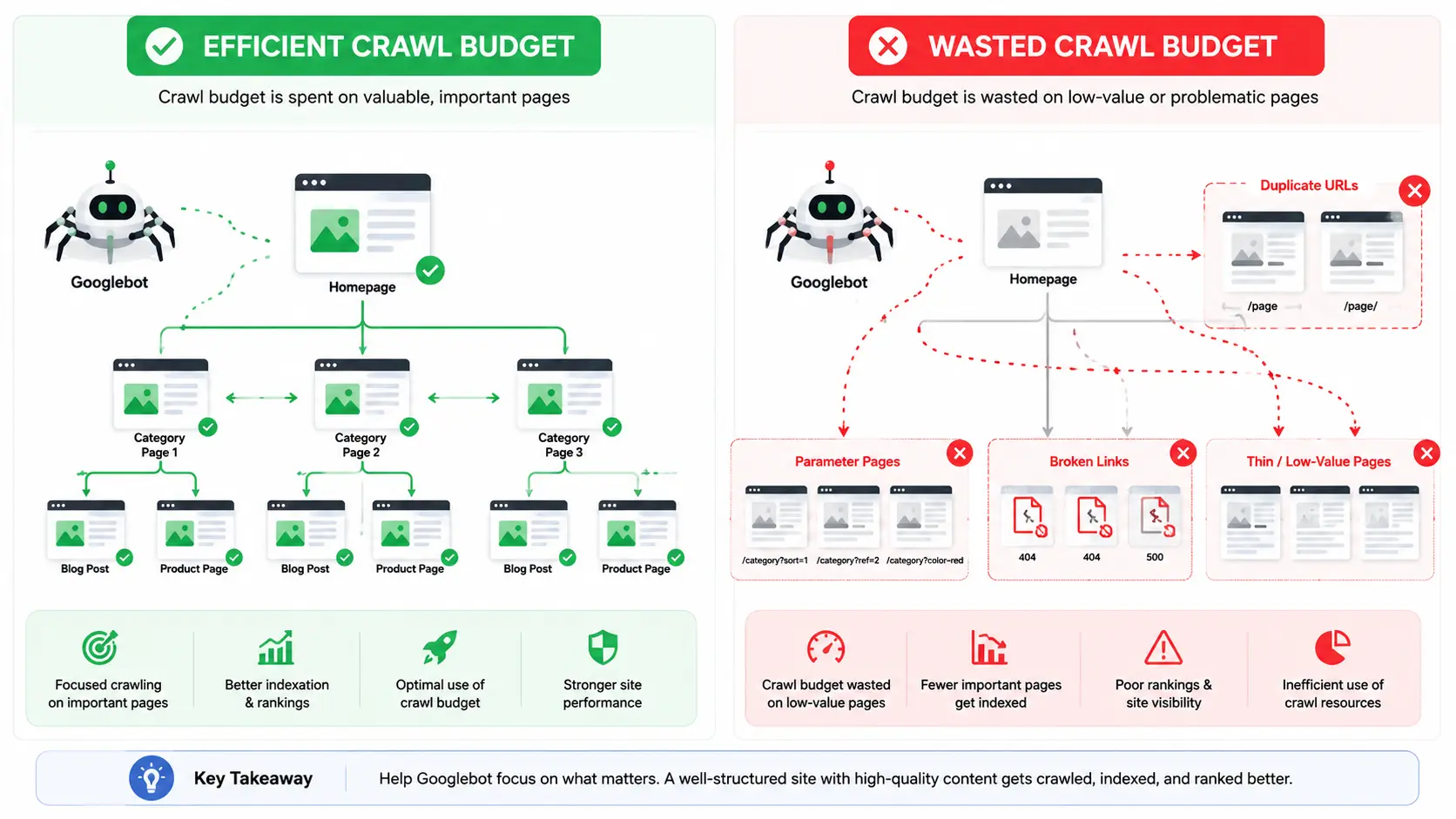
Crawl budget is one of the most misunderstood concepts in SEO, so let’s be clear about who should care. If you run a small site with a few hundred pages, you almost certainly won’t hit crawl limits Google will comfortably crawl everything that matters.
Crawl budget becomes a real concern for large sites: e-commerce catalogs with thousands of URLs, news publishers pushing content daily, or sites with heavy faceted navigation generating endless URL variations. When budget is wasted on low-value or duplicate URLs, important pages can go uncrawled and therefore unindexed.
The levers that help are practical: faster server response times, clean and current XML sitemaps, strong internal linking to priority pages, and pruning or blocking low-value URLs (via noindex, canonical tags, or robots.txt for parameters). Efficient crawling isn’t about tricking the bot into visiting more it’s about not wasting the visits you get.
Why Your Page Got Crawled but Not Indexed
This is the single most common diagnostic problem intermediate site owners face, and Google Search Console (GSC) tells you exactly what happened if you know where to look. The Page Indexing report breaks non-indexed pages down by reason. The two you’ll see most often:
- “Crawled currently not indexed”: Google fetched the page but decided it wasn’t worth storing, usually because the content is thin, unoriginal, or low value.
- “Discovered currently not indexed”: Google knows the URL exists but hasn’t crawled it yet, often a crawl-budget or priority signal.
Other frequent culprits include an accidental noindex tag, duplicate content collapsing into a canonical version of another page, or server errors (4xx/5xx) that now can exclude pages from the rendering queue entirely.
How to Get Indexed Faster
If your pages are stuck, work through this checklist:
- Submit an XML sitemap in Google Search Console so Google has a clean map of your priority URLs.
- Use the URL Inspection tool to test a live URL and request indexing directly.
- Strengthen internal links to the page orphaned pages get deprioritized.
- Deepen thin content. If a page reads like filler, expand it into something genuinely useful.
- Fix technical blockers: remove stray noindex tags, resolve server errors, and ensure critical content is in the initial HTML via SSR rather than hidden behind JavaScript.
Indexing can take anywhere from a few hours to several weeks depending on your site’s authority and crawl frequency but these steps consistently speed it up. The same indexing principles are essential for businesses and educational websites, including those offering a digital marketing course in Trivandrum, as faster indexing helps new course pages appear in search results sooner and attract relevant organic traffic.
How AI Is Changing Crawling and Indexing (2026)
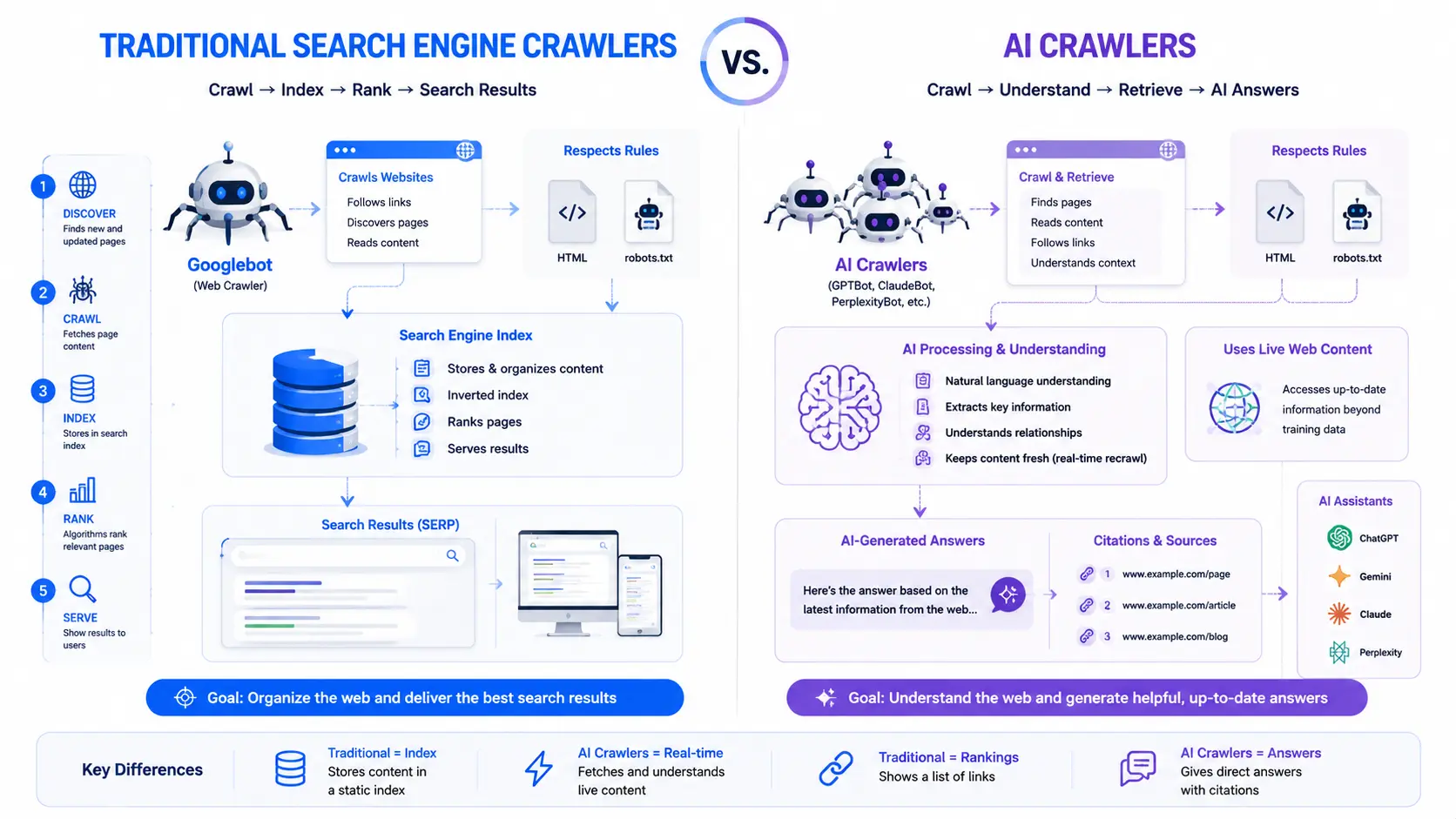
For most of search history, the crawler on your site was there to build a searchable index. That’s no longer the whole story. In 2026, a large and growing share of crawl traffic comes from AI bots GPTBot, ClaudeBot, PerplexityBot, Google-Extended, and others and they don’t all want the same thing.
Cloudflare’s data shows that most AI crawling is for model training, but the fastest-growing category is search-purpose crawling bots fetching live pages to build citations inside AI answers. Across the first half of 2026, that search slice jumped from 7.5% to 10.7% of AI crawler requests a 43% relative rise, faster than any other purpose. This is the slice that can actually send recognition, and sometimes a click, back to you.
Two practical shifts follow. First, robots.txt has become a content-licensing perimeter, not just a crawl-control file publishers now decide bot by bot who gets access to their content. Second, many AI-native engines skip JavaScript rendering entirely and read only the initial HTML. That makes server-side rendering and clean, citable writing more important, not less.
And crucially, traditional SEO still underpins all of it roughly 40% of AI citations come from pages already ranking in the top 10 of classic search results. Getting crawled, indexed, and ranked the old-fashioned way is still the foundation for showing up in AI answers.
Key Takeaways
- Search works in four stages crawl, index, rank, serve with an AI synthesis layer now on top. A failure at any stage blocks everything downstream.
- Crawled ≠ indexed ≠ ranked. Around 90% of crawled pages are never indexed, and 96.55% of indexed pages get no traffic so each stage is a filter, not a formality.
- Diagnose problems in Google Search Console, optimize crawl budget only if you run a large site, and prioritize server speed, internal linking, and SSR.
- In 2026, add a fourth outcome to the ladder cited by writing clean, authoritative content that both Google and AI answer engines can pull from.
Frequently Asked Questions
What is the difference between crawling and indexing?
Crawling is when a search engine’s bot discovers and fetches a web page by following links. Indexing is the next step, where the engine analyzes, understands, and stores that page in its database. A page must be crawled before it can be indexed, but not every crawled page gets indexed.
Why is my page crawled but not indexed?
Google may crawl a page yet not index it if the content is thin, duplicated, low quality, or blocked by a noindex tag. It can also be a canonicalization decision. Improving content depth, fixing duplicates, and strengthening internal links usually resolves it.
What is crawl budget and does it affect my site?
Crawl budget is the number of pages a search engine will crawl on your site within a given timeframe. It mainly matters for large sites with thousands of URLs small sites rarely hit limits. Faster servers, clean sitemaps, and fewer low-value pages help maximize it.
How long does it take Google to index a new page?
Indexing can take anywhere from a few hours to several weeks, depending on your site’s authority, crawl frequency, and internal linking. Submitting an XML sitemap and using Search Console’s URL Inspection tool to request indexing can significantly speed up the process.
Do AI search engines crawl websites differently?
Yes. Traditional bots crawl to build a searchable index, while AI crawlers often fetch full content for model training or real-time answers. Many AI engines skip JavaScript rendering entirely, so server-side content and clear, citable writing matter more than ever.