Google AI Max for Search changed how Search campaigns match queries, write ad copy, and pick landing pages. In 2026, Google also began moving older campaign settings onto it. This guide explains what AI Max is, what changed between its beta launch and the September 2026 migration, why you may find it switched on in your account, and which controls let you steer it. A practical review checklist and answers to common questions follow.
What Is Google AI Max for Search?
Google AI Max is a set of AI-powered features that you add to an existing Search campaign. It is not a separate campaign type, so your structure, budgets, and bidding strategy stay in place. Google launched AI Max in 2025, and the Google Ads Help Center describes it as a way to improve how ads match searches, how ad content is created, and where users land.
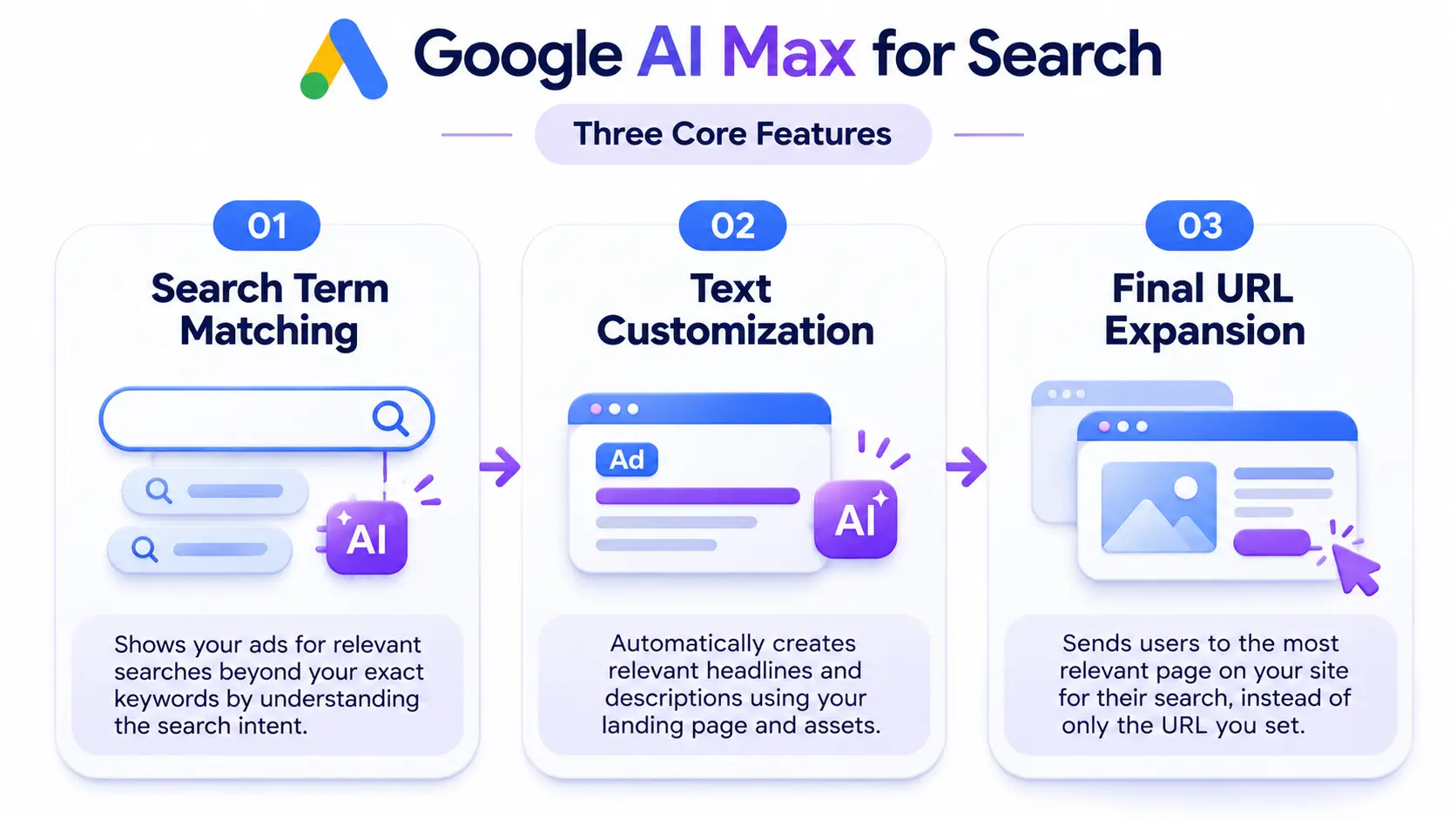
Three features sit under the AI Max switch. You can adjust each one separately, although Google recommends running them together.
Search Term Matching
Search term matching lets your ads reach queries that your keyword list does not literally contain. Google draws on your keywords, ads, and landing page content to find searches with the same intent. It works alongside broad match and keywordless matching, where the system uses your landing page content to find relevant queries even without a matching keyword. It does not override your negative keywords.
Text Customization
Text customization generates headlines and descriptions that fit each search, using your landing page and existing assets as source material. It builds on what Google previously called automatically created assets. You can add text guidelines to limit what the system says, and advertisers in regulated industries can use text disclaimers to keep required legal wording in their ads.
Final URL Expansion
Final URL expansion sends a searcher to the page on your site most likely to match the query, rather than only the URL you set. It requires text customization, so the headline matches the destination. Google also advises checking that your tracking template works with dynamic landing pages before you enable it.
What Changed With AI Max in 2026
AI Max Left Beta in April
Google moved AI Max out of beta in April 2026 and announced better targeting and creative quality. It also reported that campaigns using the full feature suite saw an average of 7% more conversions or conversion value at a similar CPA or ROAS, compared with search term matching alone, according to its official announcement. Treat that figure as a Google-reported average, not a forecast for your account.
In May 2026, Google added AI Brief and text disclaimers, which aim to give advertisers more control and transparency, as listed on its AI Max for Search campaigns page.
Legacy Settings Moved Onto AI Max
Between 1 and 30 September 2026, Google migrated two legacy Search settings. Campaigns using automatically created assets moved over with search term matching and text customization turned on. Campaigns using the campaign-level broad match setting moved over with search term matching turned on. Google described the move as happening in place, with existing brand inclusions and exclusions carrying over.
Dynamic Search Ads Follow in February 2027
Google first planned to include Dynamic Search Ads (DSA) in the September wave, then extended the timeline in June 2026. The DSA auto-upgrade now begins in February 2027. Upgraded DSA campaigns get all three AI Max features, with legacy URL controls preserved, and their dynamic ad groups become standard ad groups. Google also plans to stop advertisers from creating new DSA campaigns in Google Ads, Google Ads Editor, and the API.
Why Is Google AI Max Switched On in Your Account?
If you did not enable AI Max yourself, one of three things probably happened:
- Your campaign used automatically created assets or campaign-level broad match, and Google migrated it in September 2026.
- You created a new Search campaign and found the AI Max setting already selected. Industry reports on Google’s setup flow say new Search campaigns can start with it on, so read the settings screen before you save.
- A colleague or agency turned it on for a test and never reverted it.
To confirm, open your campaign settings and look for the AI Max section. Google also provides a dedicated AI Max reporting view that shows search queries alongside the headline and landing page combinations served, as explained by Search Engine Land. That report shows what AI Max actually did, which tells you more than the toggle itself.
Which Controls Do You Still Have?
AI Max automates matching and creative, yet you keep several levers:
- Negative keywords: They stay active, so you can still block irrelevant queries.
- Brand controls: You can set brand inclusions at campaign and ad group levels, and brand exclusions at campaign level.
- Locations of interest: You can target by geographic intent at ad group level, not only by where the user is.
- URL inclusions and exclusions: You decide which pages final URL expansion may use.
- Text guidelines: You set messaging rules for generated copy.
- Feature opt-outs: You can opt out of text customization and final URL expansion at campaign level, and out of search term matching at ad group level.
One trade-off deserves attention. Final URL expansion does not support pinning, so it can override pinned headlines when it finds a more relevant page. Advertisers with strict message order requirements should test carefully.
Should You Keep AI Max On?
The answer depends on your conversion data, your landing pages, and how much automation you accept. Google’s reported gains are averages, and individual accounts vary.
When AI Max Tends to Fit
- Your account tracks conversions accurately and uses Smart Bidding.
- Your website has clear, current pages for each product or service.
- Your campaigns rely on a narrow keyword list and miss relevant searches.
- You review the search term report regularly.
When to Be Cautious
- Legal or brand teams must approve every line of ad copy.
- Your ads depend on pinned assets.
- Your tracking template breaks on dynamic landing pages.
- Your site includes thin, outdated, or irrelevant pages that you would not want a paid click to reach.
When you feel unsure, run a Google Ads experiment that compares an AI Max version of the campaign against your current setup. A split test gives you evidence from your own data instead of relying on averages. Review results by ad group as well as by campaign, since AI Max can lift one product line while another drifts off target.
How to Review AI Max in Your Google Ads Account
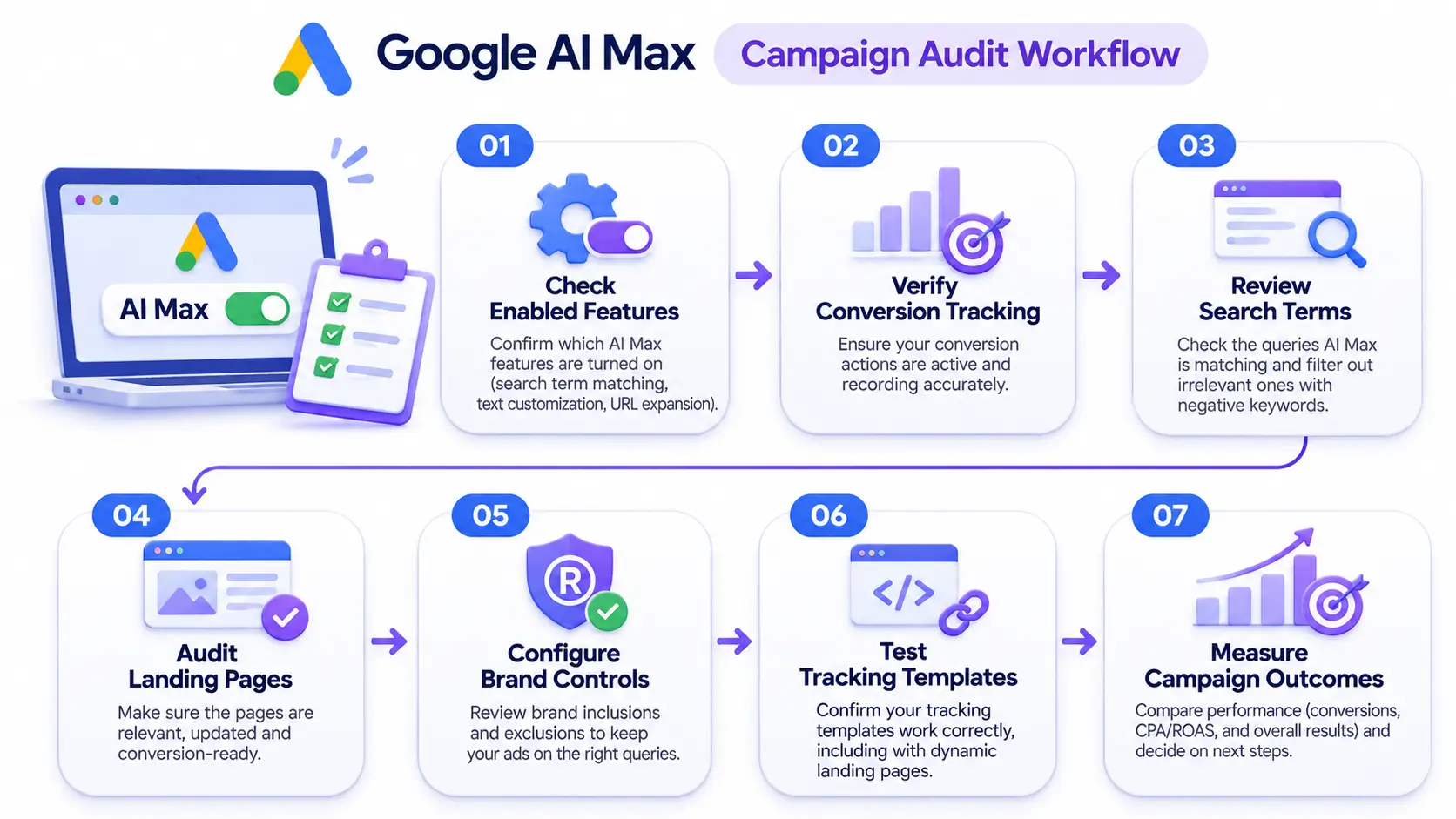
If you are still learning the interface, this Google Ads tutorial for beginners covers campaign settings and reporting basics. Many paid search teams, whether in-house or at agencies such as Dotcom Creativez, fold the following review into regular account audits.
- Confirm which features are on. Check search term matching, text customization, and final URL expansion separately.
- Verify conversion tracking. Google AI Max and Smart Bidding both learn from your conversion data, so inaccurate tracking leads to poor decisions.
- Read the search term report. Look for queries that drift from your offer, then add negative keywords.
- Audit your landing pages. Exclude pages such as login screens, careers pages, or discontinued products from final URL expansion.
- Set brand controls. Define which brands your ads should and should not appear alongside.
- Test your tracking template. Confirm that parameters survive on dynamic landing pages.
- Measure outcomes that matter. Compare cost per lead, qualified lead rate, or return on ad spend over a fixed window, not only clicks.
AI Max for Advertisers in Kerala and the UAE
Locations of interest matter most for businesses that serve more than one city. Advertisers working with digital marketing agencies across Kerala can set ad groups for service areas such as Thrissur, Kochi, Calicut, and Trivandrum, so each ad group reflects the place a customer actually mentions. Businesses targeting the Gulf can apply the same logic to Dubai and other emirates, where searchers often type a place name inside the query.
When you compare digital marketing services in Dubai or a PPC partner in Kerala, ask how they handle brand exclusions, location settings, and search term review under AI Max. Their answers show whether they manage the automation or simply accept it.
Common AI Max Mistakes to Avoid
- Judging results after a few days, before bidding has enough data to stabilize.
- Ignoring the search term report once AI Max is on.
- Leaving every page on the site eligible for final URL expansion.
- Changing several settings at once, which makes results impossible to interpret.
- Treating Google’s average uplift as a promise.
- Skipping a review of generated headlines for accuracy and brand tone, especially claims about price, availability, or services.
Frequently Asked Questions
Is AI Max a new campaign type?
No. Google AI Max is a set of features inside standard Search campaigns. Your campaign type, budget, and bidding strategy remain the same.
Can I turn AI Max off?
In campaigns where it is optional, yes. You can switch off individual features in your settings. Legacy features such as Dynamic Search Ads are being retired, so campaigns that depend on them will eventually run on AI Max features.
Does AI Max replace broad match?
No. Google AI Max works alongside broad match. The older campaign-level broad match setting was retired in favor of search term matching, which now covers that role inside AI Max.
Will AI Max change my keywords?
No. Your keywords stay in the campaign, and your negative keywords stay active. AI Max adds matching beyond them.
Will Google AI Max raise my costs?
Not necessarily. Google reports similar CPA or ROAS on average, but your results depend on your tracking, bidding, and landing pages. Monitor cost per conversion and lead quality closely during the first weeks.
How long should I test AI Max?
Run the test long enough for Smart Bidding to learn and for conversions to accumulate, usually several weeks. Keep other changes to a minimum so you can attribute any difference to AI Max.
Do I need Google AI Max for local Search campaigns?
No. It remains optional for most campaigns outside the legacy migrations. Local advertisers can test it with locations of interest and tight URL controls before deciding.
Using AI Max With Control
Google AI Max is now part of how Search campaigns work, and the 2026 migrations mean many accounts run it whether or not anyone chose it deliberately. The practical response is simple: find out which features are on, read the reports, set your brand, location, and URL controls, and measure real business outcomes. Whether you manage the account yourself or work with a team such as Dotcom Creativez, the principle stays the same: automation performs best when you give it clean data and clear boundaries.
Build Google Ads Skills With Structured Training
Ready to move from reading about Google Ads to running campaigns with confidence? Explore the Certified Digital Marketing Associate program in Kerala and take the next step in your digital marketing career.