
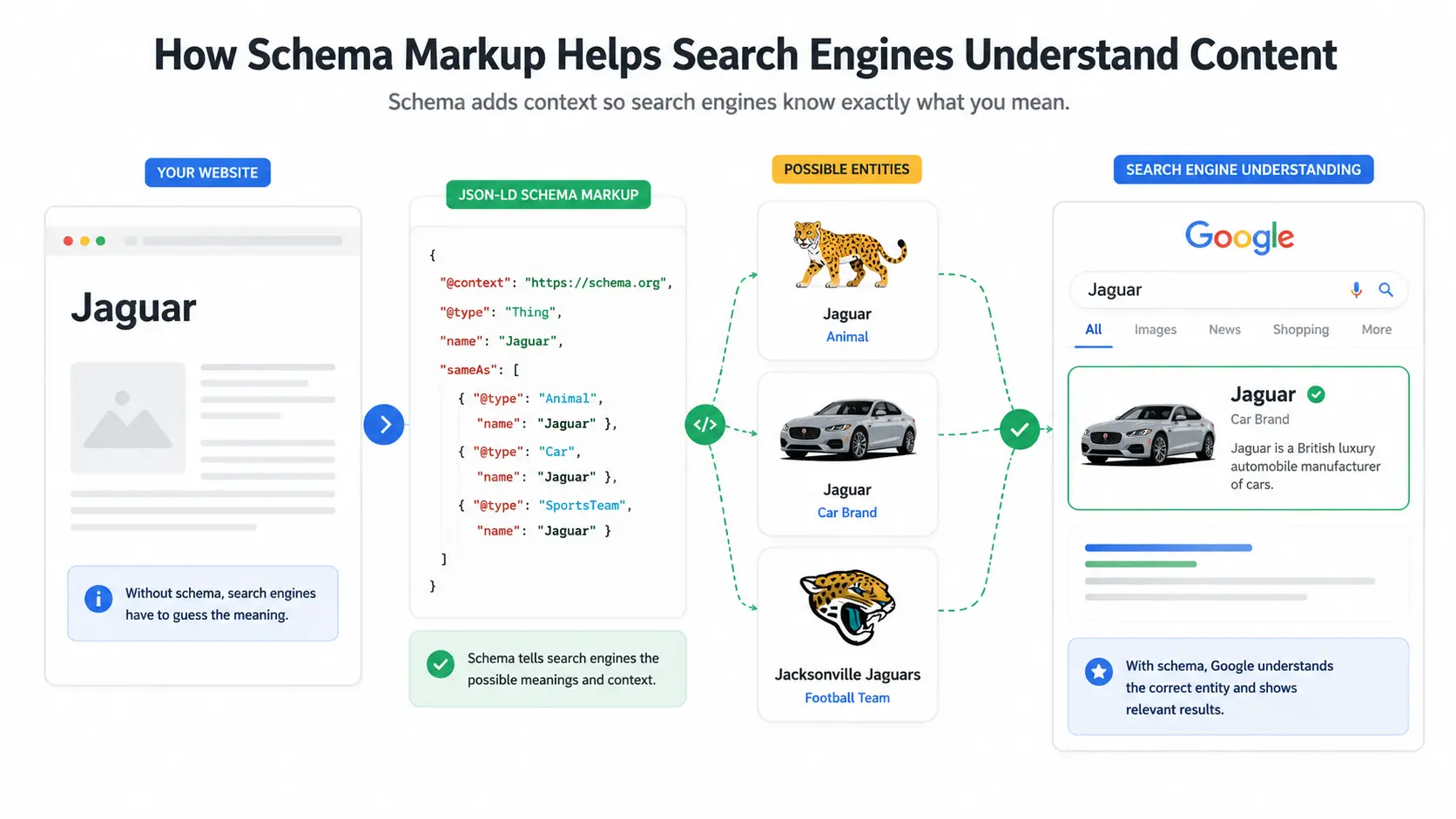
Search engines are remarkably good at reading your content, but they don’t understand it the way a human does. When a page mentions “Jaguar,” Google has to work out whether you mean the animal, the car, or the football team. Schema markup exists to remove that guesswork, and once you understand how it works, it becomes one of the easiest wins in SEO.
This beginner’s guide breaks down what schema markup is, how structured data influences your search visibility, the main types worth knowing, and exactly how to add and test it on your own site.
What Is Schema Markup?
Schema markup is a standardized form of code you add to a web page to help search engines understand what your content actually means. Instead of leaving Google to infer that “4.8” is a star rating or that “$29” is a product price, schema labels each element explicitly. That shared labeling system comes from Schema.org, a vocabulary created jointly by Google, Microsoft, Yahoo, and Yandex.
When search engines can read these labels, your page becomes eligible for rich results the enhanced listings with star ratings, prices, FAQs, and images that stand out on the results page.
Schema markup vs. structured data
These two terms get used interchangeably, and that’s mostly fine, but there’s a subtle distinction. Structured data is the broad concept of organizing information in a machine-readable format. Schema.org is the specific vocabulary most search engines agreed to use. Schema markup is what you get when you apply that vocabulary to your pages. In practice, when an SEO says “add schema,” they mean “add Schema.org structured data.”
How Search Engines Work?
Before understanding schema markup, it helps to know how search engines process web pages. The process generally involves crawling, indexing, and ranking.
- Crawling – when search engine bots discover and access your pages,
- Indexing – when they analyze and store that content.
- Ranking – the process of determining which indexed pages are most relevant and useful for a user’s search query.
Schema markup supports the understanding stage by giving search engines clearer context about the content and entities on your page.
How Schema Markup Works
The process is straightforward. When a search engine crawls your page, it parses any structured data it finds, maps that data to known entities and properties, then decides whether the page qualifies for an enhanced result.
Think of it as adding captions to a photo album. The images were always there, but the captions tell the viewer exactly who and what they’re looking at. Schema does the same for search engines, turning ambiguous text into clearly defined entities: a person, a product, an event, a recipe, an organization.
The Three Formats: JSON-LD, Microdata, and RDFa
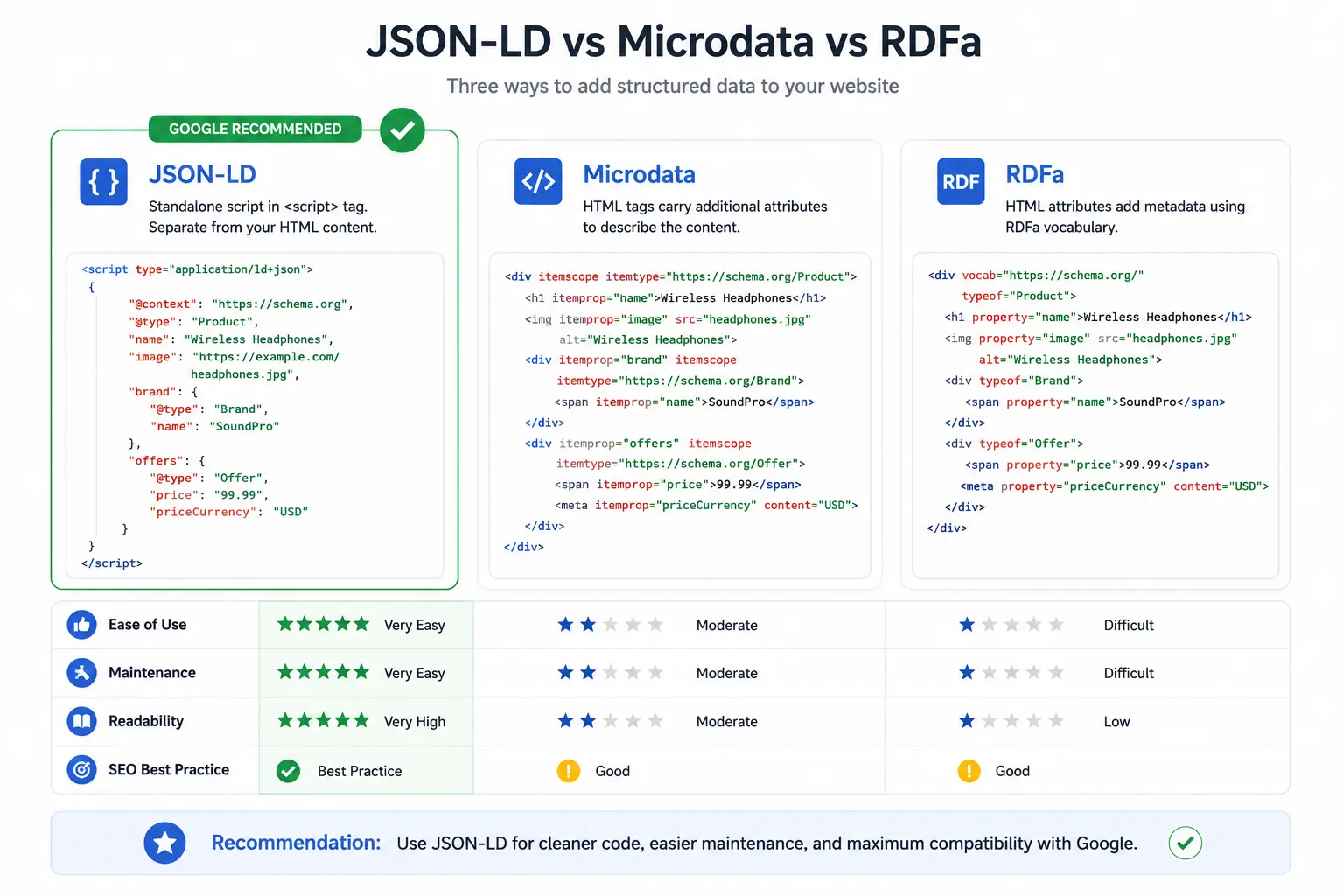
Structured data can be written in three formats. Microdata and RDFa are woven directly into your HTML tags, which makes them harder to maintain. JSON-LD sits in a single script block, separate from your visible content, so it’s cleaner and far easier to update.
Google explicitly recommends JSON-LD, and it’s the format nearly every modern tool and plugin produces. Unless you have a specific reason not to, JSON-LD is the format to use.
Does Schema Markup Actually Help SEO?
Here’s the honest answer many guides skip: schema markup is not a direct ranking factor. Google has said plainly that adding structured data won’t, by itself, push you up the rankings.
But that’s not the whole story. Schema makes your pages eligible for rich results, and rich results tend to earn more clicks because they take up more space and communicate more at a glance. In Google’s own published case studies, Rotten Tomatoes saw a 25% higher click-through rate on pages with structured data, and Nestlé reported that pages appearing as rich results had an 82% higher click-through rate.
So the value is real it’s just indirect: better visibility, higher CTR, and clearer signals about what your content represents.
Common Types of Schema Markup
You don’t need every type; you need the ones that match your content. The most widely used include:
- Article — for blog posts and news content
- Product and AggregateRating — for ecommerce listings and reviews
- FAQ — for question-and-answer sections
- Recipe — for food and cooking sites
- Event — for concerts, webinars, and listings
- LocalBusiness — for physical businesses targeting local search
- Breadcrumb and Video — to clarify site structure and surface video content
A good rule: an online store should prioritize Product schema, a publisher leans on Article and Breadcrumb, and a local service business should start with LocalBusiness.
How to Add Schema Markup to Your Website
There are three practical routes, depending on your comfort level.
Manually: paste a JSON-LD script into the <head> or before the closing </body> tag of the relevant page. You can generate the code with a free schema generator, then customize the values.
With a plugin: if you use WordPress, tools like Yoast SEO or Rank Math add common schema types automatically, with minimal setup.
Through Google Tag Manager: if you can’t edit your site’s code directly, you can deploy JSON-LD as a custom tag popular with marketers who lack developer access.
Whichever route you choose, only mark up content that actually appears on the page. Marking up hidden or nonexistent information violates Google’s guidelines.
How to Test and Validate Your Schema
Never assume your markup works; verify it. Use Google’s Rich Results Test to check whether a page is eligible for rich results, and the Schema Markup Validator to catch syntax errors. For ongoing monitoring, the Enhancements reports in Google Search Console flag structured-data issues across your indexed pages, so you can catch problems that appear after site updates.
Schema Markup, Entity SEO, and AI Search
This is where structured data is heading, and it’s the part most beginner guides ignore. Schema doesn’t just earn rich snippets; it feeds search engines’ understanding of entities and their relationships the foundation of the Knowledge Graph.
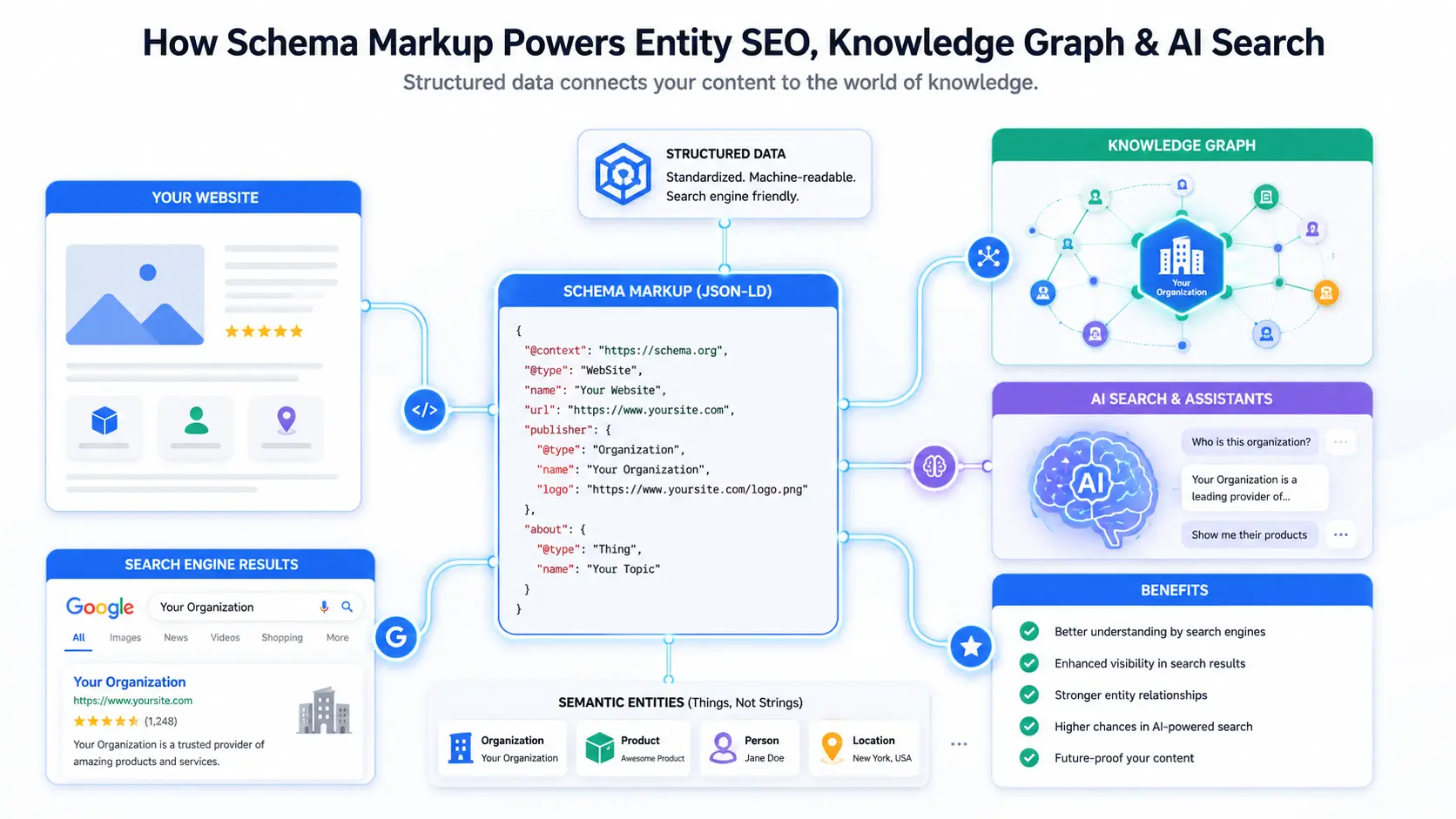
As AI Overviews and large language models increasingly summarize and cite sources directly, machine-readable context becomes more valuable, not less. Clear structured data helps these systems interpret who you are, what you offer, and how your content connects to known entities. Implementing schema today is partly about winning rich results now, and partly about future-proofing your visibility in an AI-driven search landscape.
Common Mistakes to Avoid
A few pitfalls trip up beginners. Don’t mark up content that isn’t visible on the page. Don’t rely on deprecated types; Google rolled back FAQ and How-to rich results for most sites in 2023, so those no longer display the way they once did. And don’t set it and forget it; schema often breaks silently after a template or CMS change, so re-validate periodically.
Frequently Asked Questions
Is schema markup a ranking factor?
No. Google has confirmed schema markup is not a direct ranking factor. Its value is indirect: it makes pages eligible for rich results, which can improve click-through rates and strengthen how search engines understand your content.
Which schema format should I use?
JSON-LD. Google recommends it because it sits in a separate script block, is easy to add and maintain, and works well with tools like Google Tag Manager, unlike Microdata and RDFa, which are embedded directly in your HTML.
Do I need coding skills to add schema?
Not necessarily. Plugins like Yoast and Rank Math handle common types automatically, and schema generators produce ready-to-paste code. Google Tag Manager also lets you deploy structured data without editing your site’s source files.
How long until schema markup shows results?
There’s no fixed timeline. Once Google recrawls and processes your pages, eligible rich results can appear within days to a few weeks, though eligibility never guarantees they’ll display.
Conclusion
Schema markup won’t magically lift your rankings, but it clarifies your content, earns richer and more clickable listings, and increasingly shapes how AI-powered search understands you. Pick one schema type that fits your site, add it in JSON-LD, validate it with Google’s Rich Results Test, and build from there. It’s a small technical investment with a long-term payoff.
If you’re curious about building real, practical skills in SEO, content, and strategy, enroll digital marketing course in Trivandrum a solid way to learn SEO fundamentals like this one, step by step.